Powered by Blogger.
RSS

Installing Windows 10 on any computers.

Windows 10. How do you do it?

Below I will explain how to install brand new operating system from Microsoft company, but 1st we must know what is clean install.

What is a clean install?

In a nutshell, a clean install is when you wipe your computer's hard disk and then install the operating system (in this case Windows 10) from scratch. It's a fresh start. A new beginning. A clean slate.
That all sounds good, but be careful: a clean install means everything is wiped from your PC. So before you start, be certain to make a backup of all your important data. Don't forget the little items like passwords, browser favourites and the Notepad-based to-do list sat on your desktop. Granted, a good amount of these items are now probably synchronised with the cloud, but to be on the safe side double-check you have everything you need before you proceed.

Why should I do it?

We're staunch advocates of clean-installing Windows, though we'll also admit that Microsoft's in-place upgrades work better than ever. We've upgraded a few machines to Windows 10 and have experienced no problems, and we suspect the majority of users will be perfectly satisfied with the normal procedure. Think of it as going from iOS 7 to iOS 8 on your iPhone - the in-place upgrade process usually works, it retains your data and apps, and it's as easy as pressing a few buttons and then twiddling your thumbs while the OS does all the work.
However, PC's are wonderfully unique in that they can be cluttered with lots of terrible software (dubbed bloatware) that bogs down the hardware and offers very little in return. And the bloatware isn't necessarily your fault - it's usually snuck on by the manufacturer of your machine in an attempt to generate a little extra income on the side. It's kind of like buying a new car only to find that multiple doughnut-eating passengers are coming along for the ride. You could get rid of them with a little effort, but crumbs and gooey jam would be everywhere so wouldn't it just be nicer to start over?
Our recommendation would be to try the in-place upgrade to begin with. If you're happy with it, great. If your PC still feels bogged down with unnecessary software and other erroneous clutter, spend a little time getting to grips with Windows 10 and then clean install at a time that suits you.

I want in, how do I do it?

First, the bad news: clean installing Windows 10 isn't entirely straightforward, but we've done it ourselves on more than one occasion and we've jotted down the potential pitfalls to help you avoid them.
Here's what you'll need:
  • A PC, laptop or tablet running a genuine version of Windows 7 or Windows 8.1
  • A USB pen drive (3GB or greater in size)

Step 1 - prepare your USB drive

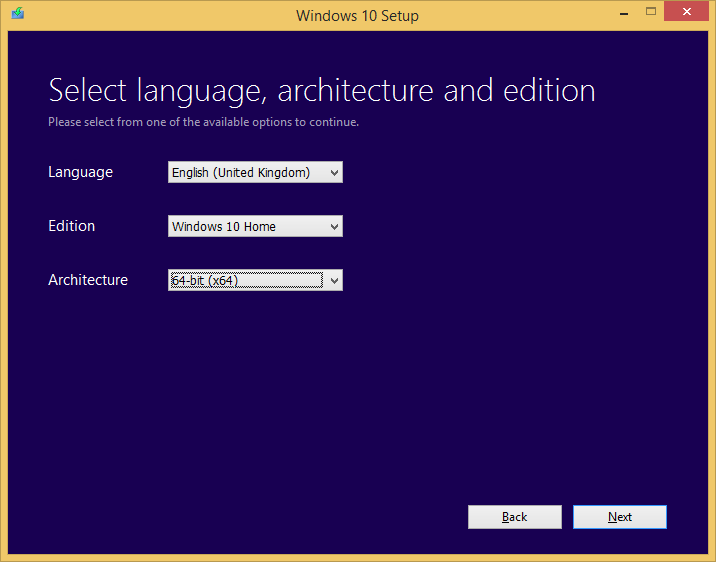
Head over to the official Download Windows 10 website to obtain the tool required to create your installation media. There are 32-bit and 64-bit utilities available, and unless your PC is particularly old, it's the 64-bit version you'll be wanting. Download and then run the tool - named 'MediaCreationToolx64.exe' and weighing in at around 19MB - and you'll be presented with a Windows 10 Setup wizard.
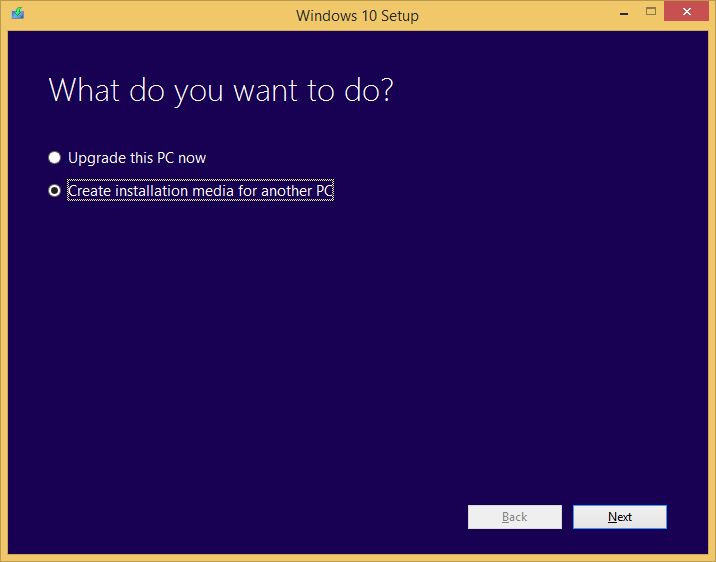
As pictured above, start by choosing 'Create installation media for another PC.' On the next screen, choose your preferred language, product edition and whether or not you want to install a 32-bit or 64-bit version of Windows 10. It'll be the latter for most, and be aware that the free upgrade mandates a like-for-like transition.
If you're a licensed user of Windows 7 Starter, Windows 7 Home Basic, Windows 7 Premium or Windows 8.1, you'll be eligible for a free upgrade to Windows 10 Home. Likewise, those using Windows 7 Professional, Windows 7 Ultimate or Windows 8.1 Pro will be eligible for the free upgrade to Windows 10 Pro. As for the 'N' product editions you'll see in the drop-down menus, feel free to ignore them completely - they simply exclude Windows Media Player in order to adhere to EU rulings and frankly make no sense to anyone.
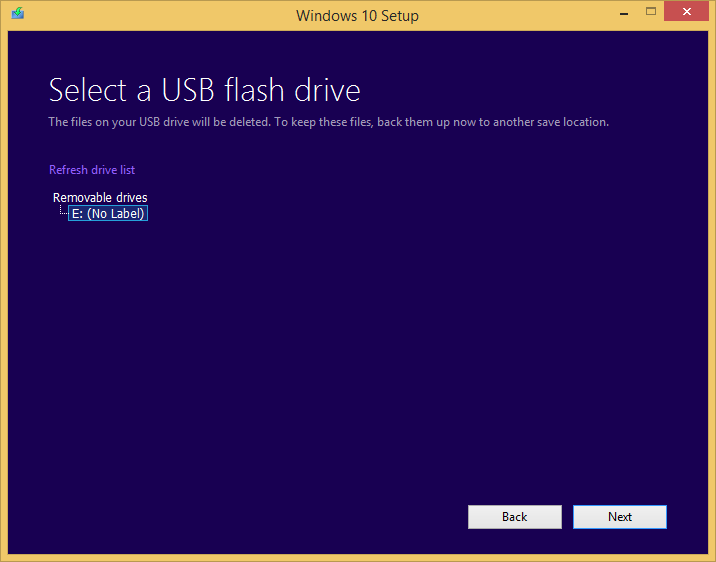
Choose 'USB flash drive' as your media device of choice, then select it from the list on the next page. It needs to be 3GB or larger in size, and note that everything on the USB drive will be deleted - if it contains any data you need, copy it off before you begin.
With the drive selected, hit next and the software will start to download the Windows 10 installation files and copy them across to your USB drive. The process can take a while, so now would be a good time to put the kettle on.
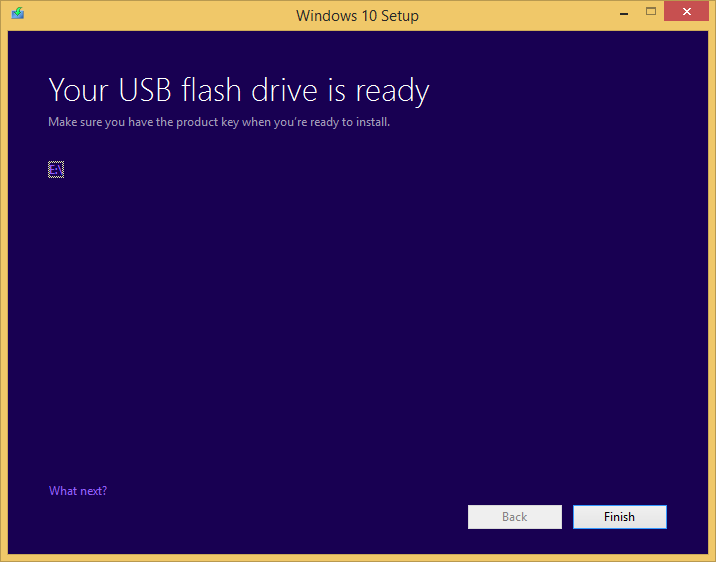
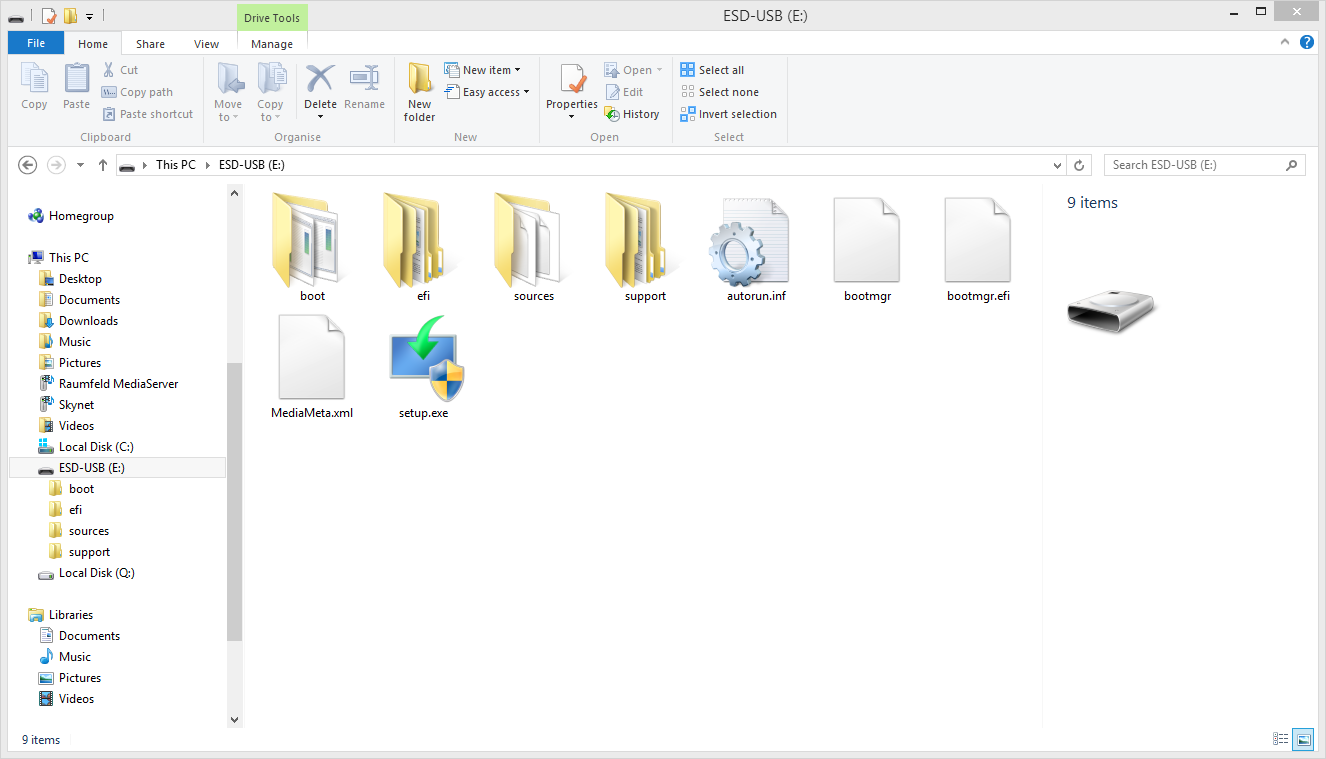
Once the process is complete simply hit finish and your USB drive is good to go - it can be used on any PC to install Windows 10, so keep it handy for any future installations. If you want to double-check, the files on your drive should tally-up to what's pictured above, right.

Step 2 - upgrade to Windows 10

Things are about to get counter-intuitive, but bear with us. In order to take advantage of the free upgrade offer and clean install Windows 10, you first need to carry out an in-place upgrade to Windows 10 from a genuine copy of Windows 7 or Windows 8.1.
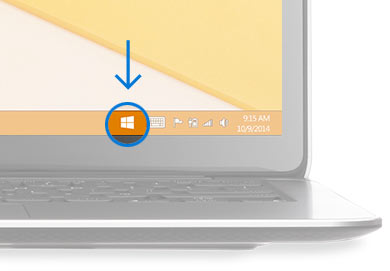
For better or for worse, this is how Microsoft has chosen to verify the free upgrade - you will only be able to activate the new OS if you perform an in-place upgrade to Windows 10 from Windows 7 or Windows 8.1. You can not clean install Windows 10 using a Windows 7 or Windows 8.1 product key.
In order to begin the upgrade, click the 'Get Windows 10' icon in your system tray and follow the on-screen instructions.
Don't see the icon? You might be able to manually trigger the update. First, make sure you have automatic Windows Updates enabled in control panel, then launch an elevated Command Prompt (Win+X, then choose 'Command Prompt Admin') and enter the following command: wuauclt.exe/updatenow
Windows 10 should then begin to download and, provided you had a genuine copy of Windows 7 or Windows 8 to begin with, Windows 10 will install and activate automatically. The activation should be instant, but there have been teething problems presumably due to the strain being placed on Microsoft's servers - wait a while and Windows 10 will activate itself.

Step 3 - the clean install

Once you've completed the in-place upgrade to Windows 10, verify that your installation is activated by heading to Settings and then Update & Security. You should see something like this:
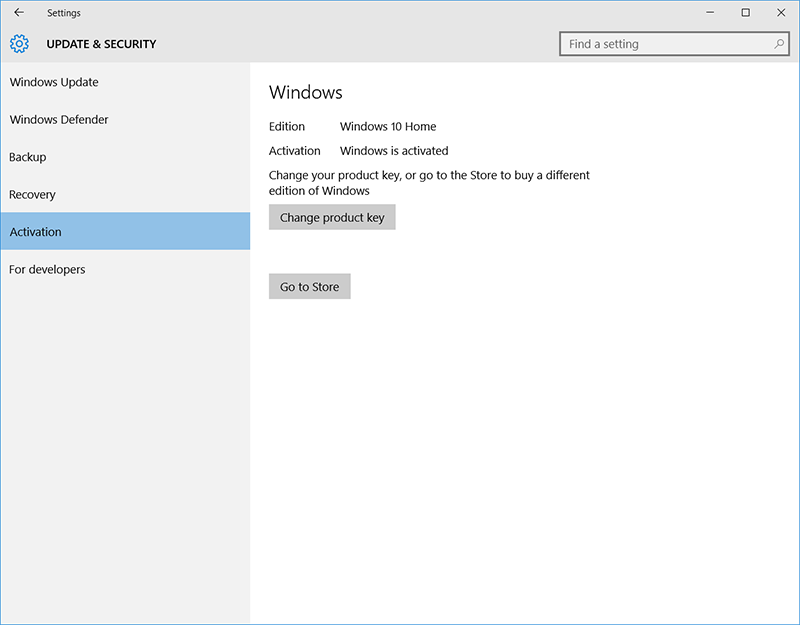
Your free upgrade has worked and the device you are using is now authorised to use the stated edition of Windows 10. This eligibility is recorded on Microsoft's servers, though we're uncertain at this stage whether the authorisation is tied to hardware IDs or your Microsoft account - we suspect it's a bit of both.
Either way, the device is now Windows 10 activated, and that means the new OS can be re-installed on the same hardware at your heart's content. You don't need a key, you simply install the OS and it'll activate whenever you're online. You just need an Internet connection.
That means we're finally ready to clean install. Here's what you do:
  • Boot from the USB drive you created in Step 1. This may require re-ordering the boot sequence in your BIOS, though some systems allow you to choose a boot device by pressing F12 at startup.
  • You'll then be greeted by the Windows 10 installation wizard. The first screen will ask you for a product key, but seeing as you've followed all the steps thus far, your device is already activated so you can happily skip this step.
  • Once you've accepted Microsoft's software license terms, you'll be asked to choose which type of installation you want - upgrade, or custom. Choose 'Custom: Install Windows Only (Advanced)'.
  • You'll now see a list of available hard drives and partitions. If you have just the one drive, and you've backed up all the data you want to keep, you can delete all the existing partitions and then select the one remaining unpartitioned volume (Drive 0). The install wizard will then automatically configure the drive and continue.
  • The installation should then begin and after a restart or two, you'll eventually arrive at a screen stating "It's time to enter the product key." Fear not, click the 'Do this later' option hiding near the bottom of the screen.
  • Choose your account preferences and you'll arrive in a clean Windows 10 desktop. Go online (if you aren't already) and Windows 10 will automatically activate by recognising the device.
It's a bit of a long-winded process, and we do wish Microsoft had allowed Windows 10 installations using Windows 7 or Windows 8 keys, but then it is a free upgrade so we're willing to jump through a few hoops.
Now that it's done, enjoy your fresh install and take solace in the fact that your next clean install of Windows 10 on the same device will be much easier - you'll only need to repeat Step 3.

What else do you need to know?

You might be wondering what happens if you upgrade your current PC to Windows 10 and then decide to build a new machine? Given that Windows 10 will be tied to your current machine, we don't imagine you'll be able to transfer the activation to another system.
How does that translate to smaller hardware changes? That remains a bit of a grey area, but we've changed the hard disk in one of our Windows 10 PCs and we've been able to carry out another clean install and activate without a problem. We suspect that bigger changes - a new motherboard, for example - may scupper the activation but we've yet to confirm that this is the case.
What if you're running Windows XP or Windows Vista? Sadly, you're out of luck - the free upgrade offer is only applicable to users of Windows of Windows 7 and Windows 8.
What if you've bought a retail copy of Windows 10? You can go straight to Step 3 and clean install using the product key that came with your software.
And then there's the big question: should you even bother upgrading to Windows 10? It is, in our estimation, shaping up to be the best Windows to date, however it's also unique in that this is the first Windows to be delivered as a service. What this means is that Windows is changing from a product that sees periodic major releases to one that's frequently being updated. As such, Windows 10 is never entirely finished, and at launch there are still bugs being squashed - there's already been a day-one patch weighing in at over 1GB.
Waiting for the quirks to be ironed out isn't the worst idea, and the free upgrade offer is currently scheduled to run until July 29, 2016, so there's really no hurry. And who knows, other, less-convoluted methods of clean installing may become available in that time.


  • Digg
  • Del.icio.us
  • StumbleUpon
  • Reddit
  • RSS

Asia is the best!! (Football Manager 12)

Hahaha, ok first of all... da lama aq x post di blog ni.. kkeke.. sibuk la rasanya.. tp skng da kembali.. kembali dgn citer baru.. FM12.. ape benda fm ni? Football Manager 12.. ghahaha... aq suka main benda ni.. best..

ok la.... tanpa melengahkan character nk kena type... aq bkn nk promote game ni.. tp kepada hardcore2 FM-mers di luar sana... dah bertahun2 berkelana di benua eropah? x teringin ke nk ke asia? hrmmm.. nk tp x tertarik dgn liga disini? betul.. dari segi kewangan, stature of club yg x konsisten buat aq teragak2 nk main di asia.. tp.. akhirnya aq wat database sndri.. dimana memartabatkan liga2 asia... hhaha... tp wat masa ni aq tumpukn liga malaysia, liga jepun ngn liga korea.. lps ni mebi lebih, dan aku juga da edit AFC champions league, ngn AFC cup, tambah 1 piala buatan sendiri, ASEAN KOC (King Of Club) dimana kelab2 terbaik ASEAN berentap ntok piala ni..

ni screenshot ntok liga malaysiascreenshot ntok ASEAN KOC
screenshot ntok liga jepun
screenshot ntok liga korea
Feature:

  1. liga malaysia change dari 14 team ke 20 team. harimau muda tukar jd harimau malaya. no age limit ntok harimau muda dan status kelab ialah profesional. ditambah 3 kelab buatan saya sendiri. ditambahkn beberapa kelab B ntok pasukan utama di liga super. prize money ditingkatkan.
  2. reputation liga di Asia di tingkatkan.
  3. AFC champions league menawarkan prize money yg lebih. struktur AFC champions jgk diubah.
  4. liga jepun di ubah mengikut citarasa saya. sama jugak ngn liga korea.
  5. suma liga dlm DB ni adalah mengikut citarasa saya. x da kena mengena ngn dunia dan akhirat.. hehehe...
  6. byk lagi perubahan sebenarnya.. x de masa nk list down.. wkwkwkw.. main sendiri ko tawo la mcm ne.. hahaha
  7. cara nk install mebi suma da tawo kot... kalo x tawo tnya.. xD
  8. db disini base on db dibuat oleh Fitri Mushardin ntok liga malaysia, manakala liga jepun plak base on ppalma di http://www.fm-base.co.uk/forum/downloads.php?do=file&id=5903 manakala liga korea buatan saya sendiri. Thanks to them..


DOWNLOAD LINK
  • doing some update.. not available yet..


  • Digg
  • Del.icio.us
  • StumbleUpon
  • Reddit
  • RSS

Window XP to Window 7?


EHEM!

For those Window XP user.. have u ever been wandering if u could get to
change ur window xp to window 7 without costing any money? hahaha...
here are 1 safetest and secure way to change ur window xp to window 7
without any hassle!!

Click to download software and find out more about WINDOW X LIVE

  • Digg
  • Del.icio.us
  • StumbleUpon
  • Reddit
  • RSS

Album letop!


Collection lagu punk rock yg sangat hebat!!
Covering for world famous artist like Lady Gaga, Katy Parry and many more!!

1. Breathe Carolina - 'Down' (originally recorded by Jay Sean ft. Lil Wayne)
2. Woe, Is Me - 'Hot 'N Cold' (originally recorded by Katy Perry)
3. Artist Vs Poet - 'Bad Romance' (originally recorded by Lady GaGa)
4. Mayday Parade - 'In My Head' (originally recorded by Jason Derülo)
5. Asking Alexandria - 'Right Now (Na Na Na)' (originally recorded by Akon)
6. This Century - 'Paper Planes' (originally recorded by M.I.A.)
7. The Word Alive - 'Heartless' (originally recorded by Kanye West)
8. Family Force 5 - 'Bulletproof' (originally recorded by La Roux)
9. Of Mice & Men - 'Blame It' (originally recorded by Jamie Foxx ft. T-Pain)
10. Miss May I - 'Run This Town' (originally recorded by Jay-Z ft. Kanye West and Rihanna)
11. The Ready Set - 'Airplanes' (originally recorded by B.o.B ft. Hayley Williams)
12. Cute Is What We Aim For - 'Dead And Gone' (originally recorded by T.I. ft. Justin Timberlake)
13. Sparks The Rescue - 'Need You Now' (originally recorded by Lady Antebellum)
14. We Came As Romans - 'My Love' (originally recorded by Justin Timberlake ft. T.I.)


DOWNLOAD LINK:
mediafire.com
pass: www.mp3boo.com

VISIT MP3BOO.COM FOR LATEST ALBUM FOR DOWNLOAD!

  • Digg
  • Del.icio.us
  • StumbleUpon
  • Reddit
  • RSS

My Chemical Romance New Album Download!!

Sepatutnya kuar 22 aribulan ni, tp.. hehe.. aq dah jumpa awal~~! ^^"
ENJOY!!!!

Link
Megaupload (available)
Mediafire (not available yet)

  • Digg
  • Del.icio.us
  • StumbleUpon
  • Reddit
  • RSS

Bleach 296

Baru nk start posting bleach episode... mebi akan dtg nnt akn upload dari episode 1~

Enjoy la dlu!

Bleach 296

  • Digg
  • Del.icio.us
  • StumbleUpon
  • Reddit
  • RSS

Care for your laptop/pc?? Try This!!

This utility offers a one-stop-shop for cleaning and maintaining your computer for better overall system performance. The interface is very simple, featuring only a few buttons, which makes it easy to get down to cleaning immediately (in fact, it automatically runs on start-up) and doesn't confuse you with multiple steps.

The Maintain Windows section focuses on four areas of maintenance: spyware removal, Registry cleaning, a privacy sweep, and deletion of junk files. The Diagnose System button provides system optimization tools, detects spyware, defragments your disk, and scans for hijacked Windows settings. In our tests the scan and clean for each of these areas took less than 10 minutes to complete. In many of these scans, it is difficult to tell what exactly is being accomplished by some of the tools, but we were able to test against other trusted apps, which confirmed Advanced SystemCare's efficacy in those areas.

Under the utilities section you are given several tools, which are similar to plug-ins, for other areas of optimization and diagnostic tests. Overall, Advanced SystemCare Free is a good way to maintain your system's speed and clear out junk files, but you'll need to remember to run it regularly because scheduling of scans is only available in the paid Pro version.

Click Here To Try This Amazing Product!!


  • Digg
  • Del.icio.us
  • StumbleUpon
  • Reddit
  • RSS

Looking for anime? Easy...

There is a site I wanted to share.. got lots of anime here.. very quick streaming.. not megavideo format...

AnimeFushigi!!

Click Here To Go..

  • Digg
  • Del.icio.us
  • StumbleUpon
  • Reddit
  • RSS


movee paling best ar...!! citer yg x pnh owng teringin nk buat!! wahhahah... presenting!!


CROW ZERO One & Two

A punk's gotta do what a punk's gotta do in "Crows: Episode 0," the third picture by prolific Japanese maverick Takashi Miike to hit the fest circuit in as many months, following "Like a Dragon" and "Sukiyaki Western Django."Recalling any number of brawling student pics from Asia - and playing sometimes like a serious version of the South Korean "Conduct Zero" (2002) - this prequel to a planned adaptation of the manga by Hiroshi Takahashi, which sold more than 32 million copies in Japan, opens locally Oct. 27. In the West, "Crows" should raise a ruckus as a culty DVD title.

The students of Suzuran High compete for the King of School title. An ex-graduate yakuza is sent to kill the son of a criminal group, but he can't make himself to do it as he reminds him of his youth.


  1. Crow Zero II click to download
Genji and his victorious G.P.S. alliance find themselves facing down a new challenge by the students of Hosen Academy, feared by everyone as 'The Army of Killers.' The two schools, in fact, have a history of bad blood between them. And the simmering embers of hatred are about to flare up again, burning away any last remnants of the truce they had so rigorously observed until now.


  • Digg
  • Del.icio.us
  • StumbleUpon
  • Reddit
  • RSS

Manga Collection


SUZUKA

Plot Summary: Yamato Akitsuki travels to Tokyo alone to study in one of the high schools located within the area. He lives in with his aunt who operates a public bath solely for the ladies in the local district and begins his normal high-school life. One day, he chances upon a girl in school and is immediately mesmerised by her beauty. He is shocked when he realise later that the girl, Suzuka, is actually living next door to him. From then on, Yamato's ordinary life begins to change little by little.

Citer ni best. X de yg mengarut ataw fantasi la.. Lebih kpda kehidupan normal manusia. So, nk download n tgk? ok!! ^^"


  • Digg
  • Del.icio.us
  • StumbleUpon
  • Reddit
  • RSS

Kompang? Not So Easy.


Wahahaha.. kompang ek? dlu, aku x pnah pn join benda2 mcm ni... ntah npa msok ja uniten, aku rasa teringin nk main kompang bila diowng announce diowng nk volunteers. hurmm, so aku pn try la tgk.. best owo.. mula2 sronok jer main.. TETAPI, lama-kelamaan, baru aku rasa betapa susahnya main kompang, irama dia, cara nk pukul dia, kedudukan tangan, huh.. semua kena jaga... sakit tuh mmg sakit la.. sakit sgt smpai kebas dari bahu smpai tapak tgn.. nk tepuk tgn pn rasa pedih.. kalo x pcaya sakit.. tgk kt gambo tuh, kompang group leader kami.. lekat kesan darah dkt kompang dia.. haaa, extreme kan? muahaha.. tp serius la sakit.. bkn benda senang kompang ni... so, susah la.. byk gak kita kena blajar n kesusahan yg dihadapi tuh x kn slalu susah, sbb lpas dah lalu semua tuh, kejayaan yg dtg, hehe.. ANYWAY! thanx to all the kompang group member especially the leader for teaching us to make perfect team from zero to hero in juz +-6 jam!!! imposible kot. hahaha. XD Thank You!

  • Digg
  • Del.icio.us
  • StumbleUpon
  • Reddit
  • RSS

World Cup Quarter Final Netherland Vs Brazil


Its WORLD CUP 2010 report.. haha.. aku nih byk benda yg aku suka cthnya.. football, music, gaming, design, and lots more.. one of it is football.. talking bout football, mezti ada world cup.. kan? haha so yesterday game involving my most favourite team.. which? brazil?? taaaakkkk!! haha.. brazil no1 dunia so semua kena sokong brazil la? sorii, im a NETHERLANDS fan!! hehe diehardcore fans Netherlands... ^^ yesterday game... best.. lots of chance.. both play well.. i try not to make this juz a one side favourish blog ok? hehe... brazil have lot of confidence... they score 1st with robinho.. then they play defensively well.. BUT!! they got a bit careless and score an own goal.. Netherlands man of match Wesley Sneijder shot hit nothing and went to the goal.. a misunderstanding between the goalkeeper Julio Cesar and Mello. this event made the brazilian lost their rythm and scatter all over the place bcoz of pressure... and the netherlands take advantage of this to score another goal on the corner by Sneijder and nicely taken corner by Arjen Robben.. and for the rest of the game, brazil trying so hard to attack and that make their defender pushing up so much and cause a lot of trouble by Robben... they try so hard to beat robben and causing another trouble for them. a red card for the own goal scorer.. perkara begini sgt memalukan terutamanya bg diri beliau. Mello, hope u can stand after all the incident after this. so thats all, and another thing, dont try to put presure on ur favourite team bcoz in the end.. they cannot cope with the pressure and stumble really hard like how brazil is now.. Sayonara! ^^

  • Digg
  • Del.icio.us
  • StumbleUpon
  • Reddit
  • RSS

Welcome To The Blog. ^^


Huah! First time blogger.. I dont know anything to do so i just try to put up a blog.. xD. Well, the name is Azmyll. Nickname on the internet is called Delacroix. If u guys ever play online mmorpg like Ran Online, Ragnarok Online, Jin Online, maybe u guys in a chance crossby me.. xD im the owner of delacroix.. hahaha.. so juz trying to do something new.. See YA! ^^

  • Digg
  • Del.icio.us
  • StumbleUpon
  • Reddit
  • RSS